 Domestic
 International
 Quick Commerce
 Dynamic Web Design
 Ecom Web Design
 Content Marketing
 Landing Page Design
 Customize Web Design
 Website Redesign
 Business Web Design
 Internet Marketing
  Google Map Listing
 City Wise Promotion
 Local SEO Services
 Social Media Marketing
 Google Adwords
 Domain Registration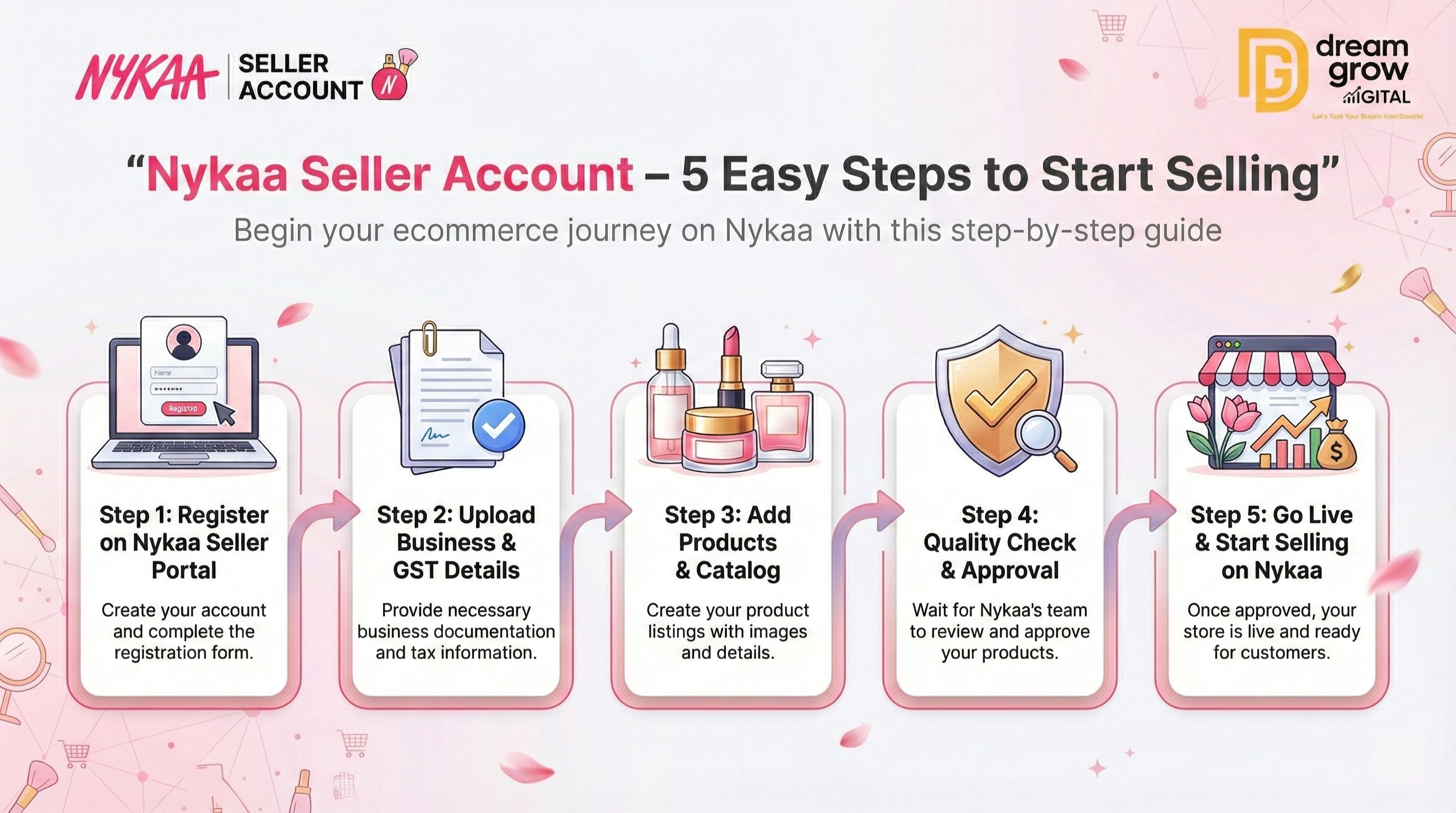
The Indian beauty and personal care market is booming, and for brands looking to scale, there is no platform quite like Nykaa. Unlike open marketplaces, Nykaa is a curated platform known for authenticity and trust. If you are wondering how to sell products on Nykaa and tap into millions of loyal beauty shoppers, you are in the right place.
Setting up a Nykaa Seller Account is slightly different from other platforms because it involves a strict verification process to ensure quality. Whether you are a new D2C brand or an established retailer, getting listed here can significantly boost your brand value. In this guide, we will walk you through the complete Nykaa seller registration process, ensuring you have all the details needed to get approved quickly.
Also, if you are exploring multiple platforms to diversify your income, you might want to check our guide on Meesho Seller Onboarding to compare different marketplace opportunities.
Why Sell on Nykaa?
Before diving into the steps, it is essential to understand why a Nykaa seller login is a gateway to success.
- Targeted Audience: Access to millions of customers specifically looking for beauty, wellness, and fashion products.
- Brand Trust: Being listed on Nykaa acts as a stamp of approval for your brand’s authenticity.
- High Average Order Value (AOV): Customers on Nykaa generally spend more per transaction compared to general marketplaces.
Step-by-Step Guide: How to Create a Nykaa Seller Account
The Nykaa seller onboarding process is designed to filter out counterfeit products and ensure only genuine sellers join the platform. Follow these 5 easy steps to register.
Step 1: Visit the Nykaa Seller Portal
To begin, you need to access the official registration page. Search for the “Sell on Nykaa” page or visit the Nykaa Seller Portal. Unlike open marketplaces where you can instantly create an account, Nykaa requires you to submit an inquiry form first. This is the initial gateway where you express your interest in becoming a partner.
Step 2: Fill Out the Seller Registration Form
Once you are on the landing page, you will see a “Register Now” or “Fill Form” button. You will need to provide accurate business details, including:
- Company Name: Your registered business name.
- Brand Name: The specific brand you wish to sell.
- Contact Details: A valid email ID and phone number for OTP verification.
- Website/Social Media: Links to your brand’s Instagram or own website (this helps the category team assess your brand presence).
- Nature of Business: Specify if you are a manufacturer, importer, or authorized distributor.
Step 3: Category Selection and Brand Review
After submitting the form, your application goes to Nykaa’s category management team. This is a crucial part of the Nykaa vendor registration. The team reviews your brand’s fit for the platform.
- Tip: Ensure your social media pages look professional and your product packaging is high-quality.
- If your brand is shortlisted, you will receive an email from the onboarding team to proceed to the next step.
Step 4: Submit Required Documents & KYC
Once you receive the approval email, you must upload the mandatory legal documents. This stage is critical for the Nykaa seller account approval time, which typically takes 5–7 business days after document submission.
Documents Required for Nykaa Seller Account:
- GST Certificate: Mandatory for all sellers.
- PAN Card: Company PAN or Proprietor PAN.
- Cancelled Cheque: For bank account verification.
- Trademark Certificate: Highly recommended for brand owners to prevent infringement.
- Authorization Letter: Required if you are selling products from other brands (distributors/resellers).
Step 5: Listing Products and Going Live
After your documents are verified, you will get access to the Nykaa seller dashboard. Now, the final step is cataloging.
- Product Listing: Upload high-resolution images on a white background.
- Descriptions: Write detailed, SEO-friendly descriptions highlighting ingredients and benefits.
- Inventory Update: Update your stock levels to ensure you are ready for the first order.
- Training: Nykaa often provides a brief training session on how to manage the dashboard and process orders.
Once your catalog is live, your products will be visible to millions of customers!
Dream Grow Digital: Your Partner in Ecommerce Success
Navigating the strict approval processes of premium platforms like Nykaa can be challenging. Dream Grow Digital specializes in helping brands and sellers with end-to-end ecommerce account management, from smooth onboarding to optimizing product listings for maximum marketplace growth. We ensure your documentation is perfect and your catalog is optimized to get you approved faster.
Understanding Fees and Payouts
Before you start selling, it is vital to know the costs involved.
- Registration Fee: There is no fee to open a Nykaa Seller Account.
- Nykaa Commission Structure: Nykaa charges a commission on every sale, which varies by category. For beauty products, it typically ranges between 10% to 25%, depending on the brand exclusivity and category margins.
- Payment Cycle: Payments are usually processed within 7–14 days after the order is successfully delivered.
Common Mistakes to Avoid During Registration
- Incomplete Documentation: Ensure your GST and PAN details match exactly. Mismatches are the https://www.google.com/search?q=%231 reason for rejection.
- Poor Image Quality: Nykaa is a visual platform. Low-quality images will lead to catalog rejection.
- Selling Restricted Items: Ensure your products comply with Nykaa’s beauty products selling on Nykaa guidelines (e.g., no prohibited ingredients).
Conclusion
Creating a Nykaa Seller Account is a strategic move for any beauty or fashion business looking to build authority and increase sales. While the process is stricter than other Nykaa ecommerce platform alternatives, the rewards in terms of customer loyalty and high ticket size are worth the effort.
By following these 5 steps and ensuring your documentation is in order, you can breeze through the Nykaa seller onboarding process. Remember, quality is key on Nykaa—focus on great products and professional presentation, and the sales will follow.
Ready to launch your brand on Nykaa? Start your registration today and take your business to the next level!
Frequently Asked Questions (FAQs)
Q1: How long does the Nykaa seller account approval take? A: typically, the approval process takes 5 to 7 business days after you submit all the valid documents. However, the initial review of your brand inquiry may take up to 2 weeks.
Q2: Can I sell on Nykaa without a GST number? A: No, a valid GST registration is mandatory for the Nykaa seller registration process. You cannot sell on the platform without it.
Q3: Is there a monthly subscription fee for the Nykaa seller dashboard? A: No, Nykaa does not charge a monthly subscription fee. You only pay a commission when you make a sale.
Q4: Can I sell generic unbranded products on Nykaa? A: Nykaa is a brand-conscious platform. It is difficult to sell generic, unbranded items. Having a registered trademark or a strong brand identity significantly increases your chances of approval.
Q5: What is the Nykaa marketplace selling guide for new sellers? A: The guide includes maintaining high product quality, ensuring 100% genuine inventory, and shipping orders within the stipulated time frame to avoid penalties.